UpSnatch vs DomCop Which Expired Domain Tool Is Right for You?
Both UpSnatch and DomCop help you find expired, dropped, auction, and marketplace domains. Neither sells domains. DomCop is a classic search-and-filter layer over a large inventory and adds a personal crawler as its main extra. UpSnatch covers the same listing types, then adds smart discovery tools on top, such as semantic search, niche SEO monitoring, and local SEO search.
Snapshots, Titles, Redirect History, Abuse Detection, Top Pages, Domain Age
Domain Age
Backlink analysis
Backlink Profile, Top backlinks, Top Ref. Domains
Backlink Profile, Top backlinks
Private list upload
-
My Domains (paid credits)
Keyword alerts
Daily keyword alerts
Saved searches, daily emails
Domain Monitoring
Projects, tags, AI / neural monitoring
WatchList
Personal crawler
-
Server-side crawler (Guru plans)
Domain review
Assessments, comments, shortlist
-
Ops dashboard
Radar for day-to-day tasks
-
Bulk export
CSV, search results (~1,000 domains)
CSV, up to 1,000 domains per file
* As of August 20, 2026, DomCop reported 29,546,993 domains in its database.
Key Differences Between UpSnatch and DomCop
Keyword filtering vs semantic search
DomCop uses keyword and pattern search inside Common, Simple, and Advanced Search. You type a string, set metric sliders (Moz DA, Majestic TF/CF, age, TLD, listing type, price), and inspect the remaining rows. That works when you already know the exact word. It falls short when the niche is broader than one label. Search dog breeds and you only see names that contain those words. To cover the market you have to type Labrador, Golden Retriever, German Shepherd, Chihuahua, and every other breed one by one. Miss a synonym and you miss the domain. DomCop does not have semantic search. It can narrow by Majestic Topical Trust Flow (for example Health or Sports) based on backlinks, which is a category filter, not meaning-based name search.
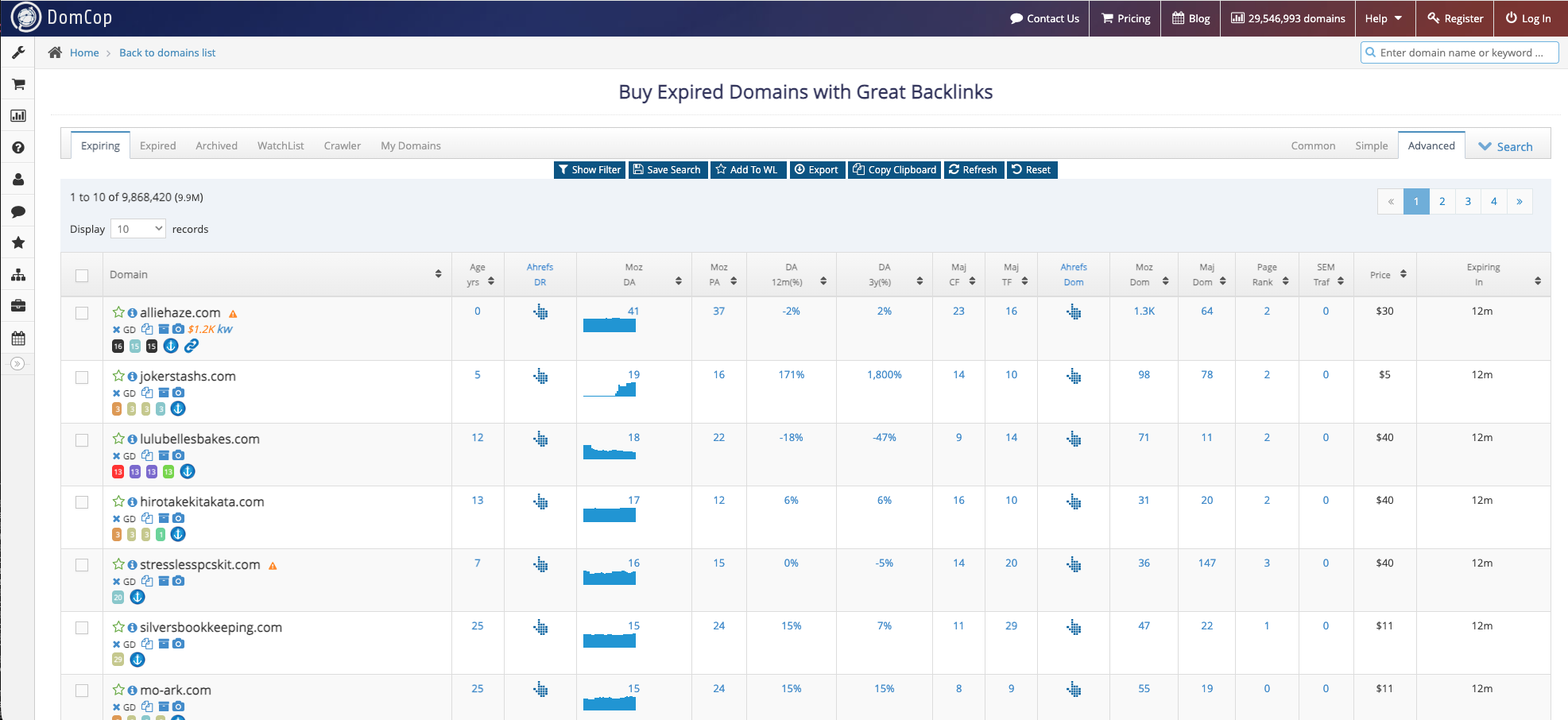
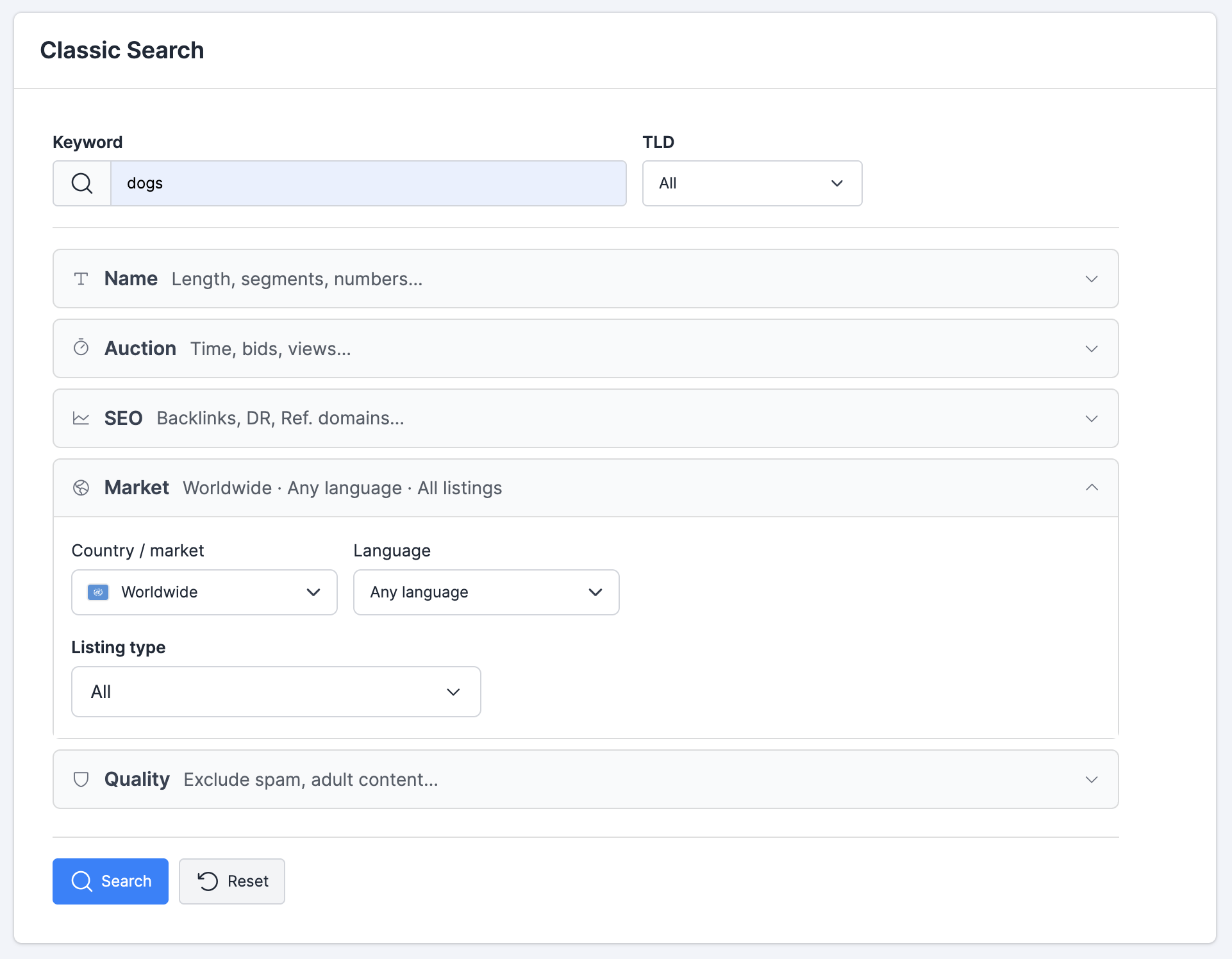
DomCop Expiring list in Advanced view, with Moz, Majestic, Ahrefs, and SEMrush columnsUpSnatch Classic Search with keyword and filter panels
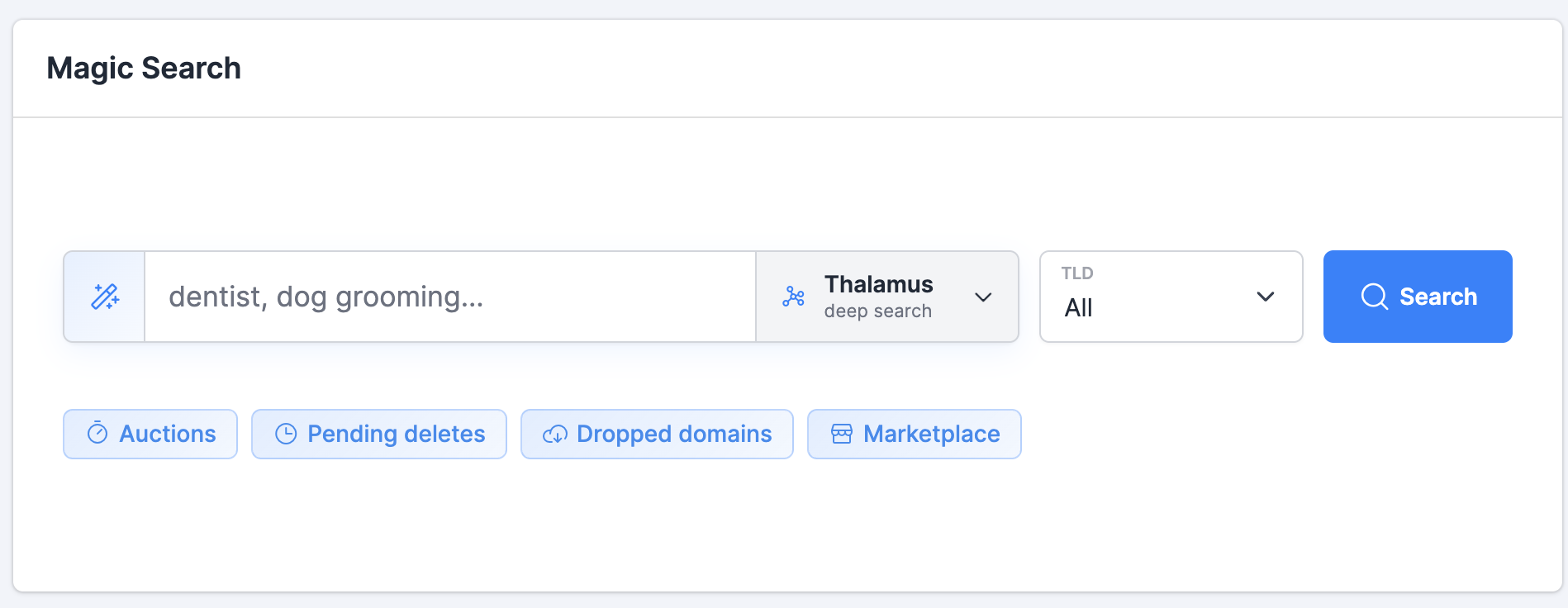
Magic Search is UpSnatch’s semantic search. You pick one of three AI models (Flash Lite, Cortex, or Thalamus) and explore a niche by meaning. A search for dentist can return orthodontist, oral care, dental clinic, veneers, or teeth. A search for dog can include puppy, labrador, kennel, canine, chien, and retriever. UpSnatch also provides traditional keyword search as Classic Search. Classic Search finds what you typed. Magic Search finds what you meant.
Keyword filtering: both. Best for semantic search: UpSnatch.
UpSnatch Magic Search with Thalamus deep search
Rule of thumb
Use Classic Search, or DomCop, when you already know the keyword and want to screen on metrics. Use Magic Search when you know the opportunity but not every word that could appear in the domain.
Local Search
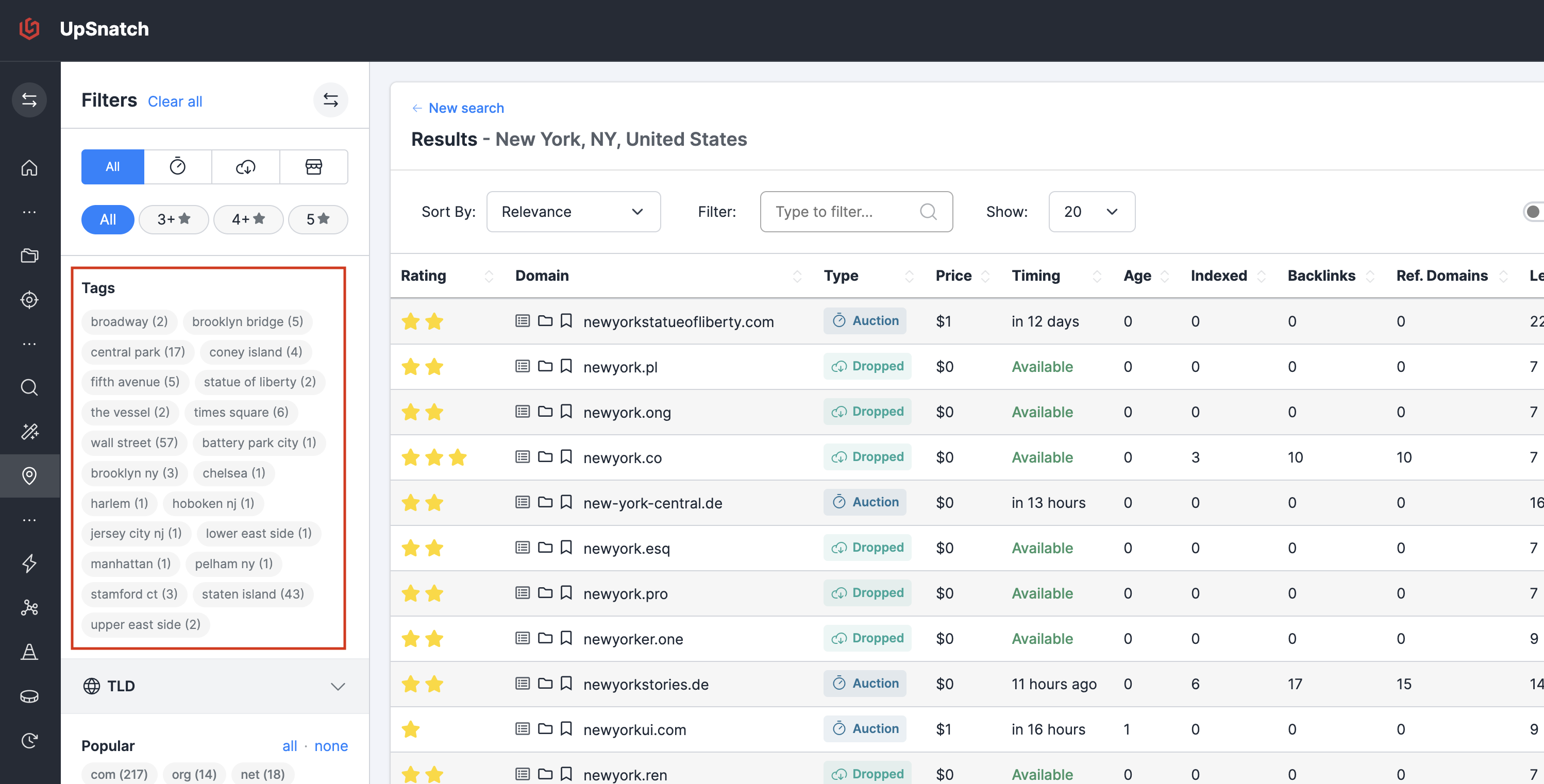
Local Search is UpSnatch’s geo search for expired, dropped, auction, marketplace, pending delete, and closeout domains tied to a place. You pick a city or region. It expands the place into nearby areas, neighborhoods, districts, and landmarks. A search for New York can include Manhattan, Queens, Times Square, Fifth Avenue, or Brooklyn Bridge. A search for London can include Soho, Camden, Oxford Street, or Tower Bridge. Local Search is built for local SEO, lead-gen, and agencies with city-level clients.
UpSnatch Local Search for New York with neighborhood tags
DomCop does not have Local Search. It can filter by domain extension and by keywords that contain a city name, but it does not expand a location into neighborhoods and landmarks.
Best for local SEO domain discovery: UpSnatch.
Personal crawler vs discovery tools
DomCop’s Guru plans include a Personal Expired Domain Crawler that runs on DomCop’s servers. The crawler scrapes websites in bulk to find domains that are available to register. Guru is $1,416/yr with 10 active crawlers. Guru II is $2,832/yr with 30. Guru III is $4,272/yr with 50. DomCop reports that Guru III customers average about 75 million pages crawled and 50,000 domains found per month. However, crawling is usually something you do once for a new project. Once you've scanned the history, you look forward from that point in time.
UpSnatch does not offer a personal web crawler. Discovery happens inside its own inventory: Classic Search, Magic Search, Local Search, and Projects. Projects are the forward-looking part. You start monitoring a niche, and UpSnatch finds the domains that expire, drop, or go to auction from that point on. Once a project is running, the future of that niche is covered.
If your workflow is “crawl the live web for broken links and available domains,” DomCop is the tool with that feature. If your workflow is “find relevant names in inventory, and keep catching every new drop going forward,” UpSnatch is built for that job.
Best for a personal expired-domain crawler: DomCop. Best for ongoing drop monitoring in inventory: UpSnatch.
Monitoring Projects
DomCop offers saved searches and a WatchList. You can save Simple or Advanced filters and optionally receive a daily email of matching domains. Daily email is limited to the Expiring section, and only domains with about two days left before expiry or auction end. WatchList lets you pin individual domains and keep them in view. That fits a metric recipe: minimum Trust Flow, certain TLDs, auction ending soon. It does not have Projects.
Projects are UpSnatch’s Domain Monitoring workspace. You write a project brief once (niche, market, language, tags). UpSnatch then watches that brief with AI and neural search, and builds a longlist as domains expire, drop, or go to auction. Projects also include:
shortlist
assessments and comments (Domain Review)
daily Keyword alerts
weekly digest
Radar, an ops dashboard for day-to-day tasks
Best for saved metric filter emails and a WatchList: DomCop. Best for Domain Monitoring with Projects: UpSnatch.
UpSnatch project shortlist with review statuses
Spam and quality assessment
DomCop’s spam checks sit on the metric grid. Moz Spam Score, a spammy-name flag, and TF/CF help you hide obvious junk before you open a row. That is useful for a first-pass filter. DomCop does not fetch historical page content from the Wayback Machine and scan it for abuse.
UpSnatch includes Spam Quality Labels (Spam through Best) in the results table, plus Majestic Spam Flags and TF/CF. The extra step is content history. UpSnatch automatically pulls snapshots from archive.org on key dates, then scans that content for abuse such as adult or iGaming pages, and raises warnings when a domain was used for that kind of site. Domain Review also shows snapshots, titles, Redirect History, and Top Pages.
Metric spam flags: both. Best for Wayback content abuse scanning: UpSnatch.
UpSnatch Domain Review with archive snapshots and spam warnings
UX and usability
UpSnatch is built for a modern research workflow: search, project, shortlist, review, act. It includes instant filters, domain profiles, Classic Search, Magic Search, Local Search, and Projects as first-class parts of the product. There is a free plan that searches inventory. It is also a newer product. The interface and feature set move quickly, with new capabilities landing every week.
DomCop is a large data table on a database. You pick Expiring, Expired, or Archived, toggle Common, Simple, or Advanced view, and inspect rows of Moz, Majestic, Ahrefs, and SEMrush numbers. That is efficient if you already think in DA, TF, and saved presets. It is heavier if you want to explore a niche, keep notes, and run a pipeline over weeks. DomCop has no free trial. Access starts at the Newbie plan, billed annually.
Best for a research workspace: UpSnatch. Best for a 90-metric screening grid: DomCop.
Which Tool Should You Choose?
Choose UpSnatch if
you want an affordable way to run filtered search, including a generous free tier
you want to find domains by meaning, not only exact keywords
you work in local SEO and need domains tied to a city, neighborhood, or landmark
you want to monitor a niche, client, or location over time with Projects
you want a free plan that actually searches inventory, with no credit card required
Choose DomCop if
you want a personal crawler that finds available domains with backlinks off the public drop lists
you want to upload your own domain lists and buy metrics with My Domains credits
you want Moz, Ahrefs, SEMrush, and Estibot metrics in one table
you screen primarily on Moz Spam Score
Frequently asked questions
Is UpSnatch a DomCop alternative?
Yes, for expired domain research. Both help you find and evaluate expired, auction, pending delete, and dropped domains. Neither sells domains. DomCop is built around a large metric grid, auctions, archive lists, and a personal crawler. UpSnatch covers the same listing types, then adds semantic search, local SEO search, and project monitoring.
What is the main difference between UpSnatch and DomCop?
DomCop is a database plus filters. On top of that it adds a personal crawler, and My Domains, where you upload your own lists and pay credits for metrics. UpSnatch is also a database plus filters. The difference is what it builds on top: extra search layers such as Magic Search and Local Search, and workflow for a typical SEO agency, including weekly monitoring, shortlisting, tracking what you will do with each domain, and an operational dashboard. DomCop is the traditional approach: collect as many SEO metrics as possible in one grid. Those metrics are extensive, and the plans are priced accordingly, from $816 per year. UpSnatch is a more modern UX, and it currently ships new features every week.
Is UpSnatch better than DomCop for expired domains?
It depends on the job. UpSnatch is better when you need niche-relevant or location-relevant domains and do not already know every keyword. DomCop is better when you want Moz, Majestic, Ahrefs, SEMrush, and Estibot metrics in one grid, a personal expired-domain crawler, or credits to score your own domain lists.
Which tool is better for finding niche-relevant domains?
UpSnatch is the better fit for niche-relevant discovery. Magic Search returns domains related to a topic by meaning, including synonyms, related concepts, and multilingual variants, instead of only exact keyword matches. Projects are the other half of that job. Relevant names do not all appear on one day. They expire, drop, or go to auction at random times through the year. A Project watches the niche continuously, so the domain is on your radar at the moment it becomes available. DomCop can filter by keyword, pattern, and Majestic Topical Trust Flow, but it does not monitor a niche that way.
Which tool has better spam or quality detection?
DomCop flags Moz Spam Score, spammy names, and TF/CF on the results grid. It does not scan archived page content. UpSnatch includes Spam Quality Labels, Majestic Spam Flags, and TF/CF, then automatically fetches archive.org snapshots on key dates and scans them for abuse such as adult or iGaming content.
Which is cheaper: UpSnatch or DomCop?
UpSnatch has a lower entry point. Explorer is $10/mo, and there is a free plan with Classic Search. DomCop has no free trial. The Newbie plan is $816/yr and covers the Expiring section. Power is $1,152/yr and adds Expired and Archived. Guru is $1,416/yr and adds the personal crawler. Last checked August 20, 2026.
Can I switch from DomCop to UpSnatch?
Yes. Create a free UpSnatch account and run Classic Search or a Magic Search preview on your niche. There is no import of DomCop saved searches or watchlists. Rebuild your process around a topic (Magic Search / Project) or around known keywords (Classic Search). Keep DomCop if you still need the personal crawler or My Domains credits.
See what UpSnatch finds for you
Start searching UpSnatch for free. No credit card required.

 Join with Google