
, Founder of UpSnatch ·
How to find expired domains for SEO

Table of contents
What makes an expired domain worth considering?
How to find expired domains: a seven-step process
- 1. Search across multiple sources
- 2. Search for the topic, not just a word in the name
- 3. Filter the broad list
- 4. Reject weak candidates quickly
- 5. Build a shortlist and review each domain
- 6. Plan the acquisition
- 7. Monitor your niche
For SEO, the ideal expired domain is a brandable or category-defining name with authority that already ranks for keywords in your niche. These domains can strengthen your brand and search visibility.
We see excellent domains drop all the time. And they are easier to get than you might think: domain investors and drop catchers stop bidding when the end user is involved.
Even easier in highly specific niches: we've seen people pick up names that could be worth a million dollars to the right buyer. If you work in asphalt pavers, concrete pumps, or aquaculture nets, you may be in luck.
Approach
Topic first, metrics second: Start by finding domains that are relevant to your niche. From that broad list, use SEO metrics to narrow your options. Finally, do your due diligence to rule out domains with spammy histories, indexing problems, or other warning signs.
What makes an expired domain worth considering?
Not every expired domain is worth buying. What counts as a good pick depends on your niche and project, but these rule-of-thumb signals are a solid place to start.
| Signal | What to look for |
|---|---|
| Topical relevance | Previous content and incoming links relate to the site you plan to build. |
| Referring domains | Links come from real, relevant sites, rather than large numbers of low-quality pages. |
| Site history | Archived versions show a coherent site, without repeated pivots into spam or unrelated topics. |
| Search visibility | Any historical rankings or traffic make sense alongside the site's content and link profile. |
No single score can tell you whether a domain is a good purchase. A high Domain Rating or Trust Flow may put a domain on your radar, but it cannot replace a look at the actual links and archived pages.
Keep Google's expired domain abuse policy in mind, too. Buying an expired domain primarily to publish unrelated, low-value content and benefit from its old reputation can violate that policy. Prefer a domain that fits a real project over one that only looks strong on paper.
How to find expired domains: a seven-step process
1. Search across multiple sources
There are hundreds of places with expiring domains (GoDaddy, Namecheap, Dynadot, etc.). But you don't want to visit every site separately: it will take ages and you will miss some domains. So you want to use an aggregator: search once, find many.
There is a caveat here. Many aggregators will only show auctions, and if they show dropped domains it's usually auctions that had no bids (the worst of the worst). You want a tool that includes dropped domains that never went to auction.
And third, for SEO you want a tool that can do semantic or neural search. If you search for dogs, you don't want to type in every kind of dog. It needs to understand what you are searching for, and come up with names like puppy, Labrador, Chihuahua, canine, or even chien.
| Tool | Price | Domains | Dropped1 | Semantic |
|---|---|---|---|---|
| ExpiredDomains.net | Free | 770M+ | Yes | No |
| SpamZilla | From $37/mo | 26M+ | Unclear | No |
| DomCop | From $816/yr | 29.5M+ | Yes | No |
| Karma.Domains | From $14.99 credits Unlimited $27.99/30d | ~8.6M | No | No |
| UpSnatch | Free Classic Search Paid from $10/mo | 56M+ | Yes | Yes |
1 Domains that dropped without appearing in an auction. DomCop advertises public and private drop lists plus an Expired/Archived register-at-fee layer. Karma’s expired inventory is mainly unsold auction leftovers. SpamZilla lists auction sources clearly; whether its “expired / available” rows include names that never went to auction is not clearly documented.
Figures last verified September 2026. For a fuller tool-by-tool breakdown, see best expired domain tools.
2. Search for the topic, not just a word in the name
If your tool can only do exact-match searches (“domain contains dog”), you will miss most of the niche. You also want to surface domains that contain labrador, puppy, kennel, or chien. Best is to use a tool that does semantic / neural search. If you only rely on query expansion (for example Karma), you will still miss a lot.
| Tool | Exact match | Query expansion | Semantic / neural |
|---|---|---|---|
| ExpiredDomains.net | Yes | No | No |
| SpamZilla | Yes | No | No |
| DomCop | Yes | No | No |
| Karma.Domains | Yes | Yes | No |
| UpSnatch | Yes | Yes | Yes |
Karma’s AI Filter turns a natural-language prompt into regular filters (query expansion only). UpSnatch Magic Search lets you pick models that cover query expansion and full semantic / neural discovery.
In UpSnatch, you can use Magic Search: enter a niche or phrase and get related expiring and expired inventory.
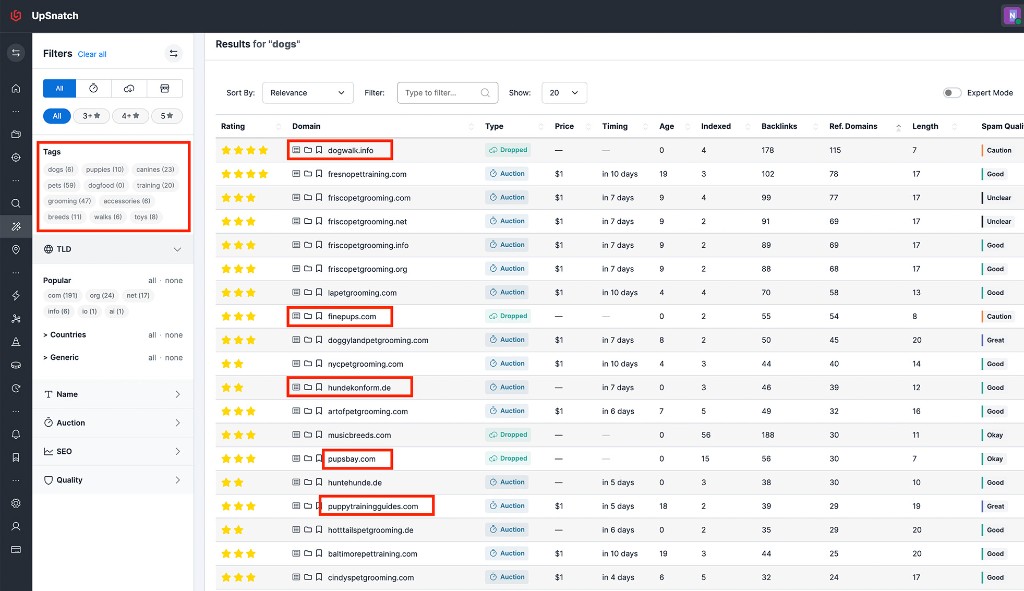
We suggest you search marketplaces first. Sometimes there are really great domains for your use case.
When you're done with the marketplaces, search for expired and dropped listings and exclude marketplaces. That yields a longer, broader list of semantically relevant results. Auctions vary more week to week.
3. Filter the broad list
Once you have a topic-relevant result set, use metrics to make it manageable. Treat filters as a starting point, not as purchase criteria.
| Filter | How to use it |
|---|---|
| Referring domains | Look for links from a range of relevant sites; inspect the sources later. |
| Trust Flow and Domain Rating | Sort or narrow the list, then check whether the underlying links justify the scores. |
| Spam or quality signals | Remove obvious low-quality candidates before spending time on manual checks. |
| Domain extension and name | Match your market, audience, and branding needs. |
| Listing type and price | Focus on domains you can realistically acquire within your budget. |
| Historical traffic | Use it as a clue to investigate, not a promise of future traffic. |
Avoid setting a universal minimum for any one score. What counts as interesting depends on the niche, the domain's history, and what you intend to build. See UpSnatch's metrics and quality signals for the available filters.
4. Reject weak candidates quickly
Before opening several SEO tools for every result, scan the name, visible metrics, and available history. Move on when you see a clear problem:
The name fits your keyword, but its past content has nothing to do with your niche.
Archived pages show gambling, adult content, pharma spam, or repeated unrelated pivots.
A strong-looking score has no convincing links behind it.
The name appears to conflict with an existing brand or trademark.
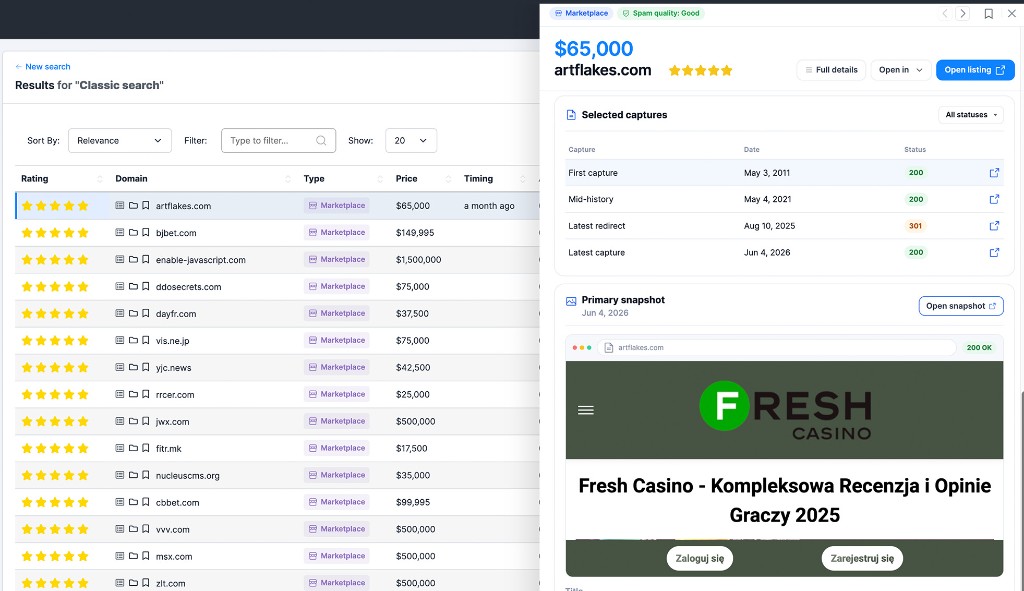
This first pass is meant to save time. A domain that survives it still needs a proper review of its backlinks, anchor text, archived pages, and search history. We will cover those checks in a dedicated evaluation guide.
5. Build a shortlist and review each domain
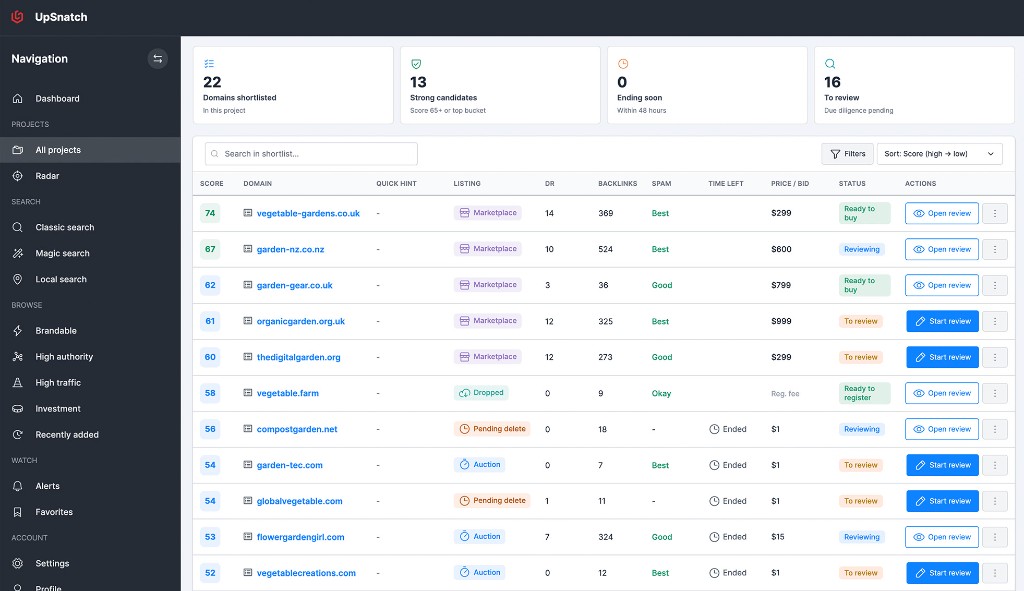
Keep your candidates in one place. For each domain, record its topic, why it caught your attention, any concerns, its listing type, and the next step. A few notes now will make it much easier to compare domains later.
Then review each shortlisted domain individually. Look at who links to it, what those links say, what the site used to publish, and whether that history fits your plan. If you use UpSnatch, Projects can help you organize your shortlist and follow-up work.
6. Plan the acquisition
The way you buy depends on the listing. A marketplace name may have a fixed price, while an auction requires you to bid. A pending-delete domain may call for a backorder or a different acquisition route.
Set a maximum budget for each domain before bidding. Base it on the value of the name and your intended project, including the work needed to build a useful site.
7. Monitor your niche
Domain inventory changes every day. The right name for your niche may appear only occasionally, so one-off searches are not enough. You want ongoing monitoring and alerts when matching domains expire, drop, or go to auction.
In UpSnatch, Projects do that job: you define the niche once, then get a continuous longlist plus weekly digests and timing cues so auctions and drops do not slip by unnoticed.
Quick checklist before you buy
Does the name suit your project and audience?
Do the old content and strongest links relate to your niche?
Is the archived history coherent and free of obvious abuse?
Have you checked the backlinks and anchor text yourself?
Does the name conflict with an existing brand or trademark?
Can you acquire the domain within a budget you set in advance?
If a domain passes those checks, you have a more defensible candidate than a name selected on metrics alone. Next, review the domain in depth, choose the right acquisition route, and decide how you will use it before you commit budget.
Frequently asked questions
How do I find expired domains for SEO?
Use an aggregator with semantic or neural search, cover auctions and dropped domains that never went to auction, filter on SEO signals, reject clear mismatches, shortlist, then review each candidate before you buy. Lists and auctions supply inventory; they are not a substitute for a niche brief.
Are expired domains good for SEO?
They can be when history and links match your project. They are a liability when you only buy age or raw backlinks. Google also flags unrelated low-value rebuilds as expired domain abuse.
Is buying aged domains for SEO still worth it?
Yes when aged means clean, relevant history plus live referring domains. Age alone is weak. Finish find and review before you treat a buy price as an SEO investment.
Should I prioritize DA/DR or topical relevance?
Topical relevance first. Use DA, DR, Trust Flow, and similar scores to rank an already relevant shortlist, not to override a bad archive.
Can I use an expired domain only for a 301?
Only when the old topic closely matches the destination and the profile is clean. Otherwise rebuild on-topic content or skip the name.
What is the difference between finding for SEO vs Local SEO?
SEO find optimizes for niche or topical match. Local SEO find prioritizes places, neighborhoods, and geo entities. See how to find expired domains for Local SEO.
How do I find old or aged expired domains?
Filter on registration age or aged inventory after a topic search, or browse aged marketplaces. Still require niche fit. Age without relevance is not an SEO win.
Try it
Run a niche query in Magic Search, filter for SEO signals, and shortlist before you open any auction tab. Open UpSnatch